
- Uyumluluk
- XenForo 2.3.x
- Ek gereksinimler
- Kurulum: Arşiv içindeki dosyaları AdminCP üzerinden içe aktarın.
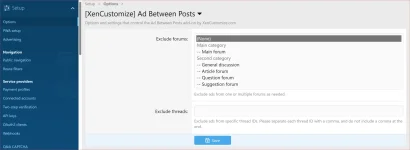
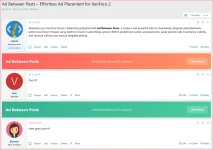
Eklenti, mesajlar arası reklam yayınlamanıza olanak tanır.
Description:
With 8 predefined custom ad placements, easily position ads to enhance visibility and revenue without any manual template editing.
NOT : Premium eklentileri indirebilmek için öncelikle "hesabınızı yükseltmeniz" gerekmektedir. Hesap yükseltme işleminin ardından dilediğiniz eklentiyi süre beklemeden indirebilirsiniz.
Advertising Positions
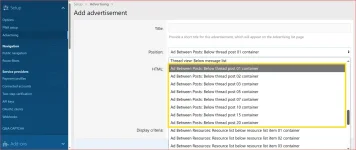
- Navigate to the Admin Control Panel (ACP).
- Go to Setup > Advertising.
- Click Add advertisement button.
- Configure your ad settings:
- Title: Provide a descriptive name for the ad block.
- Position: Select one of the 8 predefined positions:
- Ad Between Posts: Below thread post 01 container
- Ad Between Posts: Below thread post 02 container
- Ad Between Posts: Below thread post 03 container
- Ad Between Posts: Below thread post 05 container
- Ad Between Posts: Below thread post 07 container
- Ad Between Posts: Below thread post 10 container
- Ad Between Posts: Below thread post 15 container
- Ad Between Posts: Below thread post 20 container
- Display Criteria: Use XenForo’s built-in display options to refine to whom the ad should appear.
Ekran Görüntüleri
 Ücretsiz
[XenConcept] Watched Categories 2.0.1 Patch Level 1
 Ücretsiz
[XenCustomize] Events Manager 2.3.6.3